Every call answered. Day and night.
Give it a name and your voice. It answers in your organization's name, books appointments, takes messages and puts callers through to the right person or department. For shops, companies, nonprofits, colleges and universities.
- Says it's an AI on every call
- Nothing recorded unless you choose
- A person is one key away
- Answering within a day
Here's how a call goes
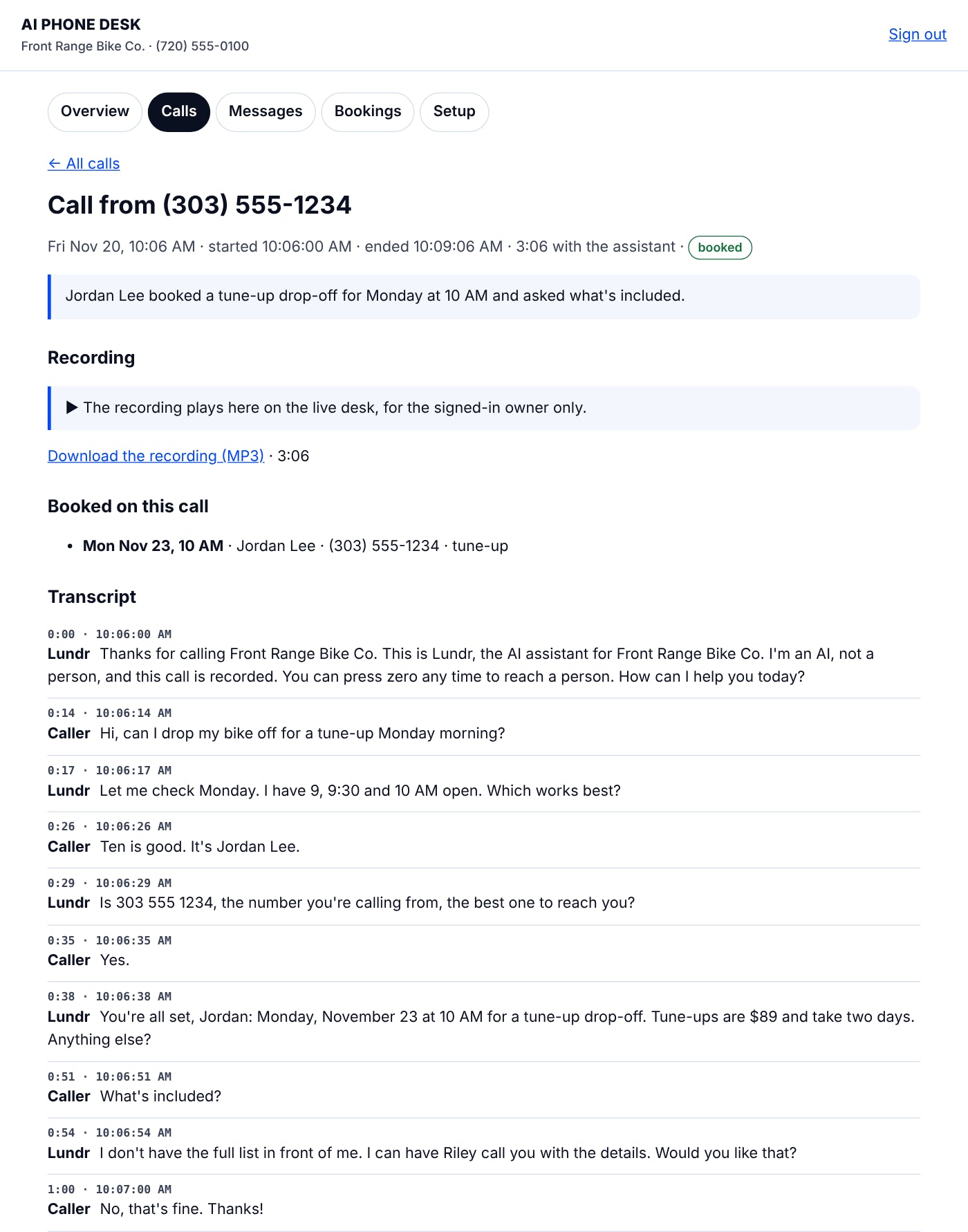
A caller wants a tune-up. The assistant checks the calendar, books it, reads it back, and hands off what it can't answer. Every line is kept with its time, if you choose to keep transcripts.
- 0:00 · 9:41:00 AMLundrThanks for calling Front Range Bike Co. This is Lundr, the AI assistant for Front Range Bike Co. I'm an AI, not a person, and this call isn't recorded. You can press zero any time to reach a person. How can I help you today?
- 0:14 · 9:41:14 AMCallerHi, can I drop my bike off for a tune-up Monday morning?
- 0:17 · 9:41:17 AMLundrLet me check Monday. I have 9, 9:30 and 10 AM open. Which works best?
- 0:26 · 9:41:26 AMCallerTen is good. It's Jordan Lee.
- 0:29 · 9:41:29 AMLundrIs 303 555 1234, the number you're calling from, the best one to reach you?
- 0:35 · 9:41:35 AMCallerYes.
- 0:38 · 9:41:38 AMLundrYou're all set, Jordan: Monday, November 23 at 10 AM for a tune-up drop-off. Tune-ups are $89 and take two days. Anything else?
- 0:51 · 9:41:51 AMCallerWhat's included?
- 0:54 · 9:41:54 AMLundrI don't have the full list in front of me. I can have Riley, our mechanic, call you with the details. Would you like that?
- 1:00 · 9:42:00 AMCallerNo, that's fine. Thanks!
- 1:02 · 9:42:02 AMLundrThanks for calling. See you Monday!
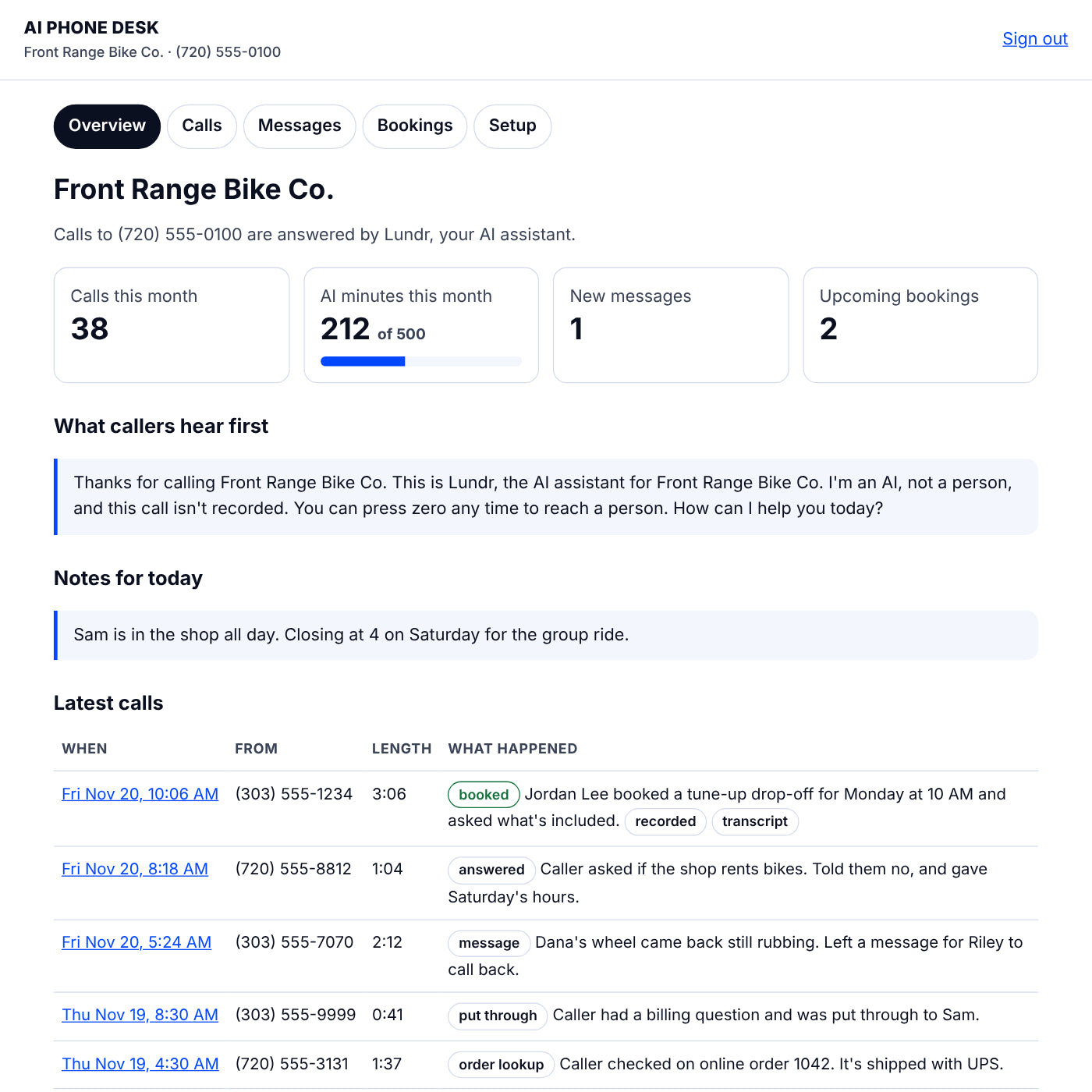
On the owner's desk a minute later: Jordan Lee booked a tune-up drop-off for Monday at 10 AM. The booking, the summary and the transcript are on your desk, and you got an email.
Any organization, any size
Start from a template made for yours. It fills in what's empty and never overwrites what you wrote.
Small businesses
Shops, trades and offices: it books, takes messages and puts callers through, in your name.
Corporations
Departments, team sign-ins with roles, a change log, and topics it never discusses, like staff details or unannounced news.
Nonprofits
Programs, giving, volunteers and events, each with its own inbox. It never takes donations by phone or shares donor names.
Colleges and universities
Admissions, Financial aid, the Registrar, Housing and IT, each reached by name. Student records stay off-limits (FERPA).
Your name. Your voice. Your answers.
Make an agent that sounds like your organization, and is honest every time.
Name it
Lundr, Ralphie, Front Desk: whatever fits. It says its name, and that it's an AI, on every call.
Give it your voice
Warm, upbeat, calm, polished or plain. Words to use, words it never says, and how it closes a call.
Upload your brand guide
PDF, Word or text. It drafts a short "how we talk" guide from it. You edit and approve it before any caller hears it.
Approved answers
The questions that need an exact answer get the answer you wrote, every time.
Off-limits topics
What it never discusses or confirms, even when the caller says who they are. It offers a message or a person instead.
Departments
Each with what it handles, a transfer line, and its own email for messages.
Team sign-ins
Managers see everything; staff see only their department's messages. Every change goes in a change log.
Try it first
Chat with your agent in your desk before it answers a real call. Nothing is saved while you practice.
It learns what to add
When a caller asks something it can't answer, it writes the question down. Add the answer in one click.
Set up in an afternoon
No app to install, no new phone system. You keep your phones; the desk answers the calls you don't.
Get your desk number
You get a local number. Keep your own by forwarding it: every call, or only the ones you miss.
Tell it about your business
Hours, services, prices, who takes which calls, and today's notes. It only says what you wrote.
It answers
Day and night, in your business's name. It books, takes messages and puts callers through. Press zero always reaches a person.
You get the record
A summary of every call by email, and your desk with every call, message and booking.
Everything a front desk does on the phone
Every plan includes all of it.
Books appointments
Checks your calendar, offers open times, books one and reads it back. Never double-books.
Takes messages
Name, number and what they need. Urgent ones reach you right away.
Puts callers through
To the right person by name or role. If nobody picks up, it comes back and takes a message.
After hours, your way
When you're closed, calls go where you choose: your on-call line, or messages only.
Callers manage their bookings
They can check, move or cancel a booking, but only from the phone that made it and under the name it's booked in.
Text confirmations
A text with the day and time, sent only when the caller says yes.
Answers order questions
For Shopify stores: order status, after the caller gives the order number and the email on the order.
Eight languages
English, plus Spanish, Vietnamese, Korean, French, Portuguese, Russian and Japanese. Callers press a key and it switches mid-call.
Calendar sync
Paste your calendar's private link and busy times stay off the booking list. Bookings show up in Google, Apple or Outlook calendar.
Reminder texts
A text the day before, only for callers who said yes.
Your desk on your phone
Add it to your home screen and get a quiet notice when an urgent message comes in.
Transcripts with times
Turn them on and every line is kept with when it was said. Callers are told, and old ones delete themselves after the days you choose.
Recordings
Turn them on to play or download any call from your desk. Every caller hears that the call is recorded first.
Search and spreadsheets
Find any call by number or word. Download calls, messages and bookings as a spreadsheet.
Blocked numbers
Spam callers and pests are turned away before the assistant answers.
Reports and alerts
A Monday email with your week, and a heads-up at 80% and 100% of your minutes.
Put your own numbers in
Every call that rings out is a customer who may call someone else. Here's what that adds up to, by your own numbers.
Every call, on the record
Sign in from your phone or computer to see every call, message and booking. Open any call for its summary, recording and transcript, or download it all as a spreadsheet.
Pick the minutes you need
Every plan includes your desk number, the owner's desk, your own agent, bookings, messages, transfers and eight languages. Minutes are time the assistant spends on calls. When they run out, calls go straight to your phone. There are no surprise charges.
Starter
- About 50 calls a month (at 3 minutes each)
- Every feature on this page
- Email support
Front Desk
- About 170 calls a month
- Every feature on this page
- Email support, answered within one business day
Full Office
- About 500 calls a month
- Every feature on this page
- Priority email support
Organizations
- For companies, nonprofits, colleges and universities
- Departments with their own lines and inboxes
- Team sign-ins with roles and a change log
- Your brand guide turned into your agent's voice
- We set it up with you
·
We set up your number, write what your assistant knows from your website, and make test calls with you before it goes live.
·
For a busy month. Added to your desk within one business day.
Each purchase is one month of service. Renew whenever you like. Prices in USD; taxes at checkout.
Thirteen trade templates
Pick yours and the questions callers ask in your trade are already laid out for you to answer.
Bike shops
Tune-up drop-offs, repair status questions, rentals or not.
Salons and barbershops
Haircuts by stylist, late and cancellation policy.
Heating and air
Service visits, service area, what to do with no heat.
Plumbing
Service visits, and what to do right now about a leak.
Electricians
Estimate visits, service area, licensing questions.
Auto repair
Drop-offs, makes you work on, shuttle or loaners.
Restaurants
Reservations, hours, menus and diets, takeout.
Property management
Showings, maintenance requests, applications.
Law offices
Consultation intake. Case details stay off-limits.
Accounting and tax
Appointments and what to bring. Client returns stay private.
Gyms and studios
Classes, memberships, first visits.
Pet grooming and boarding
Appointments, vaccines, drop-off times.
Cleaning services
Estimates, service area, how pricing works.
The lines it holds on every call
Your callers deal with your name. The assistant is built so you never have to worry what it said.
- It says it's an AI.First thing, every call, and whenever someone asks.
- A person is one key away.Press zero reaches a person whenever you have someone set to take calls.
- Nothing is recorded unless you choose.Only a short summary is kept. Turn on transcripts or recordings and every caller is told first.
- It only answers calls.It never places a call of its own, so there are no AI cold calls.
- It only says what you wrote.Anything else becomes a message for you. It never makes up prices or promises.
- No payments by phone.It never takes card numbers. No medical, legal or financial advice.
- Order details stay private.It shares an order's status only after the caller gives the order number and the email or phone on it.
- Callers can't talk it out of its rules.Whatever a caller says, the rules stay the rules.
- Your voice never overrides honesty.Brand guides shape how it sounds, never whether it tells the truth. You approve every draft first.
- Off-limits means off-limits.Student records, donors, staff, clients: it won't confirm or deny a thing, and offers a person instead.
Sell AI receptionists to your clients
With the agency licence below, you run the engine and your clients get their own agents.
Buy the agency licence
Run the engine on your own Cloudflare, Twilio and Claude accounts, for as many clients as you sign.
Send clients the setup form
Each client describes their organization; you make their desk in one click, from the right template.
Make each agent theirs
Their name, their voice from their brand guide, their departments and team sign-ins.
Charge what you like
Your clients, your prices. Every desk stays separate: its own number, its own sign-in, its own calls.
Run it on your own servers
Buy the engine itself: the same software behind every desk here. It runs on your Cloudflare account with your Twilio numbers and your Claude key. One server answers for as many businesses as you sign up.
- Your numbers, your data.Calls, recordings and records stay on your own Cloudflare and Twilio accounts.
- One server, many businesses.Each business gets its own desk number, its own sign-in, and only its own calls.
- Tested.It comes with more than 260 automated checks to run before every change.
The engine
Download right after you pay. Includes the put-it-live guide and 123 automated tests.
AI-PHONE-DESK-ENGINE-v2.zip
· src/: the server and the desk
· test/: 123 checks
· schema.sql: the database
· PUT-IT-LIVE.md: the guide
· LICENSE.md: the licence
Questions
Does it work for big organizations?
Yes. Add departments, each with its own transfer line and inbox, give each person their own sign-in, and see every change in the change log. For several lines or a custom setup, choose Organizations under Plans and we'll set it up with you.
Does it work with our phone system?
Yes. Any phone system can send calls to your desk number: as a menu choice, as overflow when the line is busy, or after hours. Larger systems (a PBX, a session border controller, or Microsoft Teams through its SBC) can send calls straight to the desk over SIP, with its own address for each department. Transfers can go back to extensions, and the person hears who's calling and why before they pick up.
Can it send calls and messages to our CRM or help desk?
Yes, through webhooks. Every call summary, message, booking and transfer can be sent to your own server, or through Zapier, Make or Power Automate to tools like Salesforce, HubSpot, ServiceNow or Zendesk. Each event is signed so your system knows it came from your desk.
Can it sound like our brand?
Yes. Name it, choose its tone, list words to use and avoid, and upload your brand guide. It drafts a short phone guide from the guide that you edit and approve. Your voice never overrides the honesty rules: it always says it's an AI.
Will it keep student or donor information private?
Yes. List what's off-limits (student records under FERPA, donor names, staff details) and it won't discuss, confirm or deny any of it. It offers a message or a person instead. It's not built for health information, so it isn't offered to medical offices.
Can I try it before it answers real calls?
Yes. Your desk has a Try it chat that uses your real settings. Nothing is saved, booked or sent while you practice.
Is it legal to have an AI answer my phone?
Businesses commonly use AI to answer their calls. The desk tells every caller it's an AI, offers a person, and never makes calls of its own. Recording laws differ by state, so recordings stay off unless you turn them on, and then every caller is told first. This isn't legal advice; ask your own lawyer about your business.
Can I keep my phone number?
Yes. Forward your number to your desk number. You can forward every call, or only the ones you don't pick up.
What happens when my minutes run out?
Calls go straight to your phone, or callers are asked to call back if you prefer. You get an email at 80% and at 100%, and you can add minutes anytime. There are no surprise charges.
How long does setup take?
Within one business day of buying, you get your desk sign-in and number. Then write what the assistant should know, choose who gets transfers, and forward your line. That takes most owners an hour or two. Or choose done-for-you setup and we'll do it with you.
Does it work for doctors' or dental offices?
Not yet. Health information has its own privacy rules (HIPAA), and the desk isn't built for them, so it isn't offered to medical offices for now.
Can it take payments?
No. It never takes card numbers by phone. It can tell callers how you take payment, if you write that in.
What does it sound like?
A natural voice that answers as the caller speaks and stops when they talk over it. You choose its name, its tone and the voice in your setup.
Who sees my calls?
Only you and the people you give a sign-in, signed in to your desk. Staff can be limited to their own department's messages. Transcripts and recordings are kept only if you turn them on, and they're deleted after the days you choose (90 by default).
Can I cancel?
Yes, anytime. Your minutes last until the end of the month you've paid for.
Make your agent this week
Tell us about your organization in the setup form. We'll set up your agent from it, and you can try it in a chat before it answers a real call.